
Quick Summary
Poor desk habits can contribute to neck, shoulder, and back pain, especially when working from home. Learn how better ergonomics, regular movement, standing desks, proper screen positioning, and a supportive chair can make your workday more comfortable. This guide also covers simple exercises and workspace changes that can help reduce strain. If pain continues despite these adjustments, Elite Spine & Health Center offers personalized chiropractic care for patients in Houston and Spring, Texas.
Working at a desk all day can leave your back, neck, and shoulders feeling stiff and sore. This can be even harder when you work from home without a proper office setup. Poor posture, long periods of sitting, and an improperly positioned computer can all contribute to discomfort.
The good news is that a few changes can make your desk ergonomics much better. From alternating between sitting and standing to adjusting your monitor, these simple habits can help reduce strain and make your workday more comfortable.
Why Desk Work Can Cause Pain
Your body is not designed to remain in one position for hours at a time. Sitting for long periods can place extra stress on your spine, especially when you slouch or lean toward your computer.
Working from home can make the problem worse. You may work from a couch, bed, kitchen table, or other surface that was not designed for extended computer use.
Common problems linked to poor desk habits include:
- Neck pain and stiffness
- Lower back pain
- Shoulder tension
- Headaches
- Muscle fatigue
- Poor posture
- Reduced mobility
- Wrist and arm discomfort
These problems can build gradually. You may not notice the effects until discomfort begins interfering with your work or daily activities.
Improve Your WFH Ergonomics
A comfortable WFH setup does not need to be complicated. Start by looking at how your workstation fits your body.
Keep Your Screen at Eye Level
Your monitor should sit at approximately eye level. This helps you avoid constantly looking down at your screen.
If you use a laptop, consider placing it on a stand or another stable raised surface. Pair it with a separate keyboard and mouse so you can keep your arms in a more comfortable position.
Avoid pushing your head forward toward the screen. This common posture, sometimes called “tech neck,” can increase strain on the muscles of your neck and shoulders.
Position Your Keyboard and Mouse Properly
Keep your keyboard close enough that your elbows can remain near your body. Your shoulders should stay relaxed instead of lifting toward your ears.
Your mouse should also be within easy reach. Constantly reaching forward or to the side can contribute to shoulder and upper-back tension.
Choose a Supportive Chair
A good office chair can make a major difference in your desk ergonomics. Look for a chair that supports your lower back and allows your feet to rest comfortably on the floor.
Try to keep your:
- Feet flat on the floor
- Knees comfortably bent
- Hips supported by the seat
- Lower back supported
- Shoulders relaxed
- Head positioned over your shoulders
You do not need to hold yourself rigidly upright all day. The goal is to maintain a comfortable position and change positions regularly.
Do Not Sit All Day
One of the most helpful changes you can make is simply moving more.
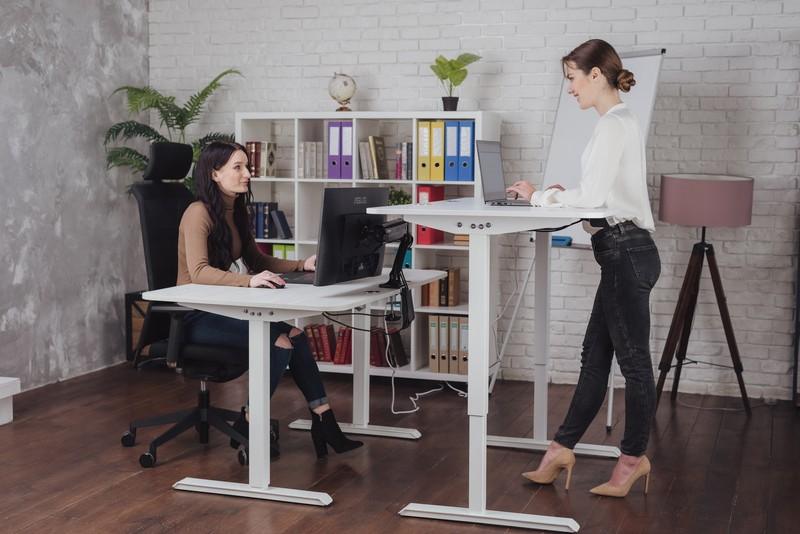
Standing desks can make it easier to alternate between sitting and standing. However, standing for hours without moving is not the answer either. The goal is to change positions throughout the day.
A sit-stand desk can make this easier. You might sit for part of your morning, stand for another period, and return to sitting when needed.
You can also create different work areas in your home. For example, use your desk for focused work and a properly arranged counter for short standing tasks.
Take Regular Movement Breaks
Even with a good ergonomic setup, staying in one position for too long can lead to stiffness.
Set a reminder every 30 to 45 minutes to stand up and move. Your break does not need to be long. Walk around the room, stretch your legs, refill your water, or perform a few gentle movements.
These short breaks can interrupt prolonged sitting and give your muscles a chance to move.
If you cannot leave your workstation, change your position and perform gentle movements at your desk.
Add Exercise to Your Routine
Your work setup is only one part of maintaining a healthy back and neck. Regular physical activity can also help you stay strong and mobile.
Depending on your abilities and fitness level, useful exercises may include:
- Squats
- Wall push-ups
- Bird-dogs
- Side bridges
- Curl-ups
- Gentle neck rotations
- Walking
- Swimming
- Yoga
- Pilates
Strengthening your core, back, and other supporting muscles can help you maintain better movement throughout the day.
If you have persistent pain or an existing injury, talk with a qualified healthcare professional before beginning a new exercise routine.
Do Not Work From Your Bed or Couch
Working from your bed may sound comfortable, but it can encourage awkward positions. The same applies to working from a couch where you are leaning to one side or curling forward.
These positions can place unnecessary stress on your neck and back.
Whenever possible, create a dedicated workspace. Even a small desk and supportive chair can be a better option than working from soft furniture for several hours.
Make Your Workspace Work for You
Good ergonomics is about more than buying an expensive desk or chair. Look at the entire setup.
Your monitor, keyboard, mouse, chair, and desk should work together. Keep frequently used items within easy reach so you do not have to repeatedly twist or stretch.
Pay attention to lighting, too. Glare can cause you to lean closer to your screen, which can contribute to poor posture.
If you notice yourself repeatedly shifting into an uncomfortable position, your workstation may need adjustment.
Are Standing Desks Better Than Sitting Desks?
Standing desks can be useful, but they are not a cure-all.
Standing may help reduce the amount of time you spend sitting and encourage more movement during your workday. However, standing in one place for too long can also cause discomfort and fatigue.
The better approach is to alternate between sitting, standing, and moving.
A height-adjustable sit-stand desk gives you more flexibility. You can change your position based on your comfort and the task you are completing.
What If You Already Have Back or Neck Pain?
Changing your workstation can help reduce unnecessary strain, but it may not resolve an existing condition.
Persistent back or neck pain can have many possible causes. If your discomfort continues despite improving your workspace, consider speaking with a healthcare professional.
At Elite Spine & Health Center, our team evaluates musculoskeletal concerns and develops treatment plans based on each patient’s needs. Chiropractic care may be appropriate for certain types of back, neck, and other musculoskeletal pain.
If your pain is affecting your work, exercise, sleep, or daily activities, schedule an appointment to discuss your concerns.
Frequently Asked Questions
Yes. Long periods of sitting, poor posture, and an improperly arranged workstation can place extra strain on your spine, neck, and shoulders.
Try to change positions or take a short movement break every 30 to 45 minutes. Standing, stretching, or walking briefly can help reduce stiffness.
A standing desk can reduce prolonged sitting, but standing all day is not ideal either. Alternating between sitting and standing is a better approach for many people.
Keep your monitor around eye level and about an arm’s length away. Your keyboard should sit at a comfortable height, with your shoulders relaxed and your feet supported.
Tech neck refers to neck strain caused by repeatedly leaning the head forward while using a computer, laptop, tablet, or phone. It can contribute to stiffness, headaches, and muscle tension.